# Administrators (User-Guide)

# Command overview

## Commands &amp; Permissions

<p class="callout info">&lt;required&gt; - To execute the command, this argument must be specified.  
\[optional\] - This argument does not have to be specified and can be omitted. A default value will be selected.  
&lt;Name&gt; - The name of the selected world.</p>

<p class="callout info">If possible, all required parameters are tabbable (can be completed using the tab key).</p>

<table id="bkmrk-command-arguments-bes" style="border-collapse: collapse; width: 100%; height: 1559.6px;"><colgroup><col style="width: 25.0298%;"></col><col style="width: 25.0298%;"></col><col style="width: 25.0298%;"></col><col style="width: 25.0298%;"></col></colgroup><tbody><tr style="height: 29.8px;"><td style="height: 29.8px;">**Command**

</td><td style="height: 29.8px;">**Arguments**

</td><td style="height: 29.8px;">**Description**

</td><td style="height: 29.8px;">**Permission(s)**

</td></tr><tr style="height: 80.2px;"><td style="height: 80.2px;">[/gcreate](https://books.gilljan.de/books/gworld-documentation-en/page/gcreate-create-worlds "/gcreate - Create Worlds")

</td><td style="height: 80.2px;">&lt;Name&gt; \[Environment\] \[Seed\] \[Generator\]

</td><td style="height: 80.2px;">Creates a new world. Environment (Normal/Nether/End) is optional, as are Generator and Seed.

</td><td style="height: 80.2px;">gworld.commands.create

</td></tr><tr style="height: 188.2px;"><td style="height: 188.2px;">[/gimport](https://books.gilljan.de/books/gworld-documentation-en/page/gimport-import-existing-worlds "/gimport - Import existing worlds")

</td><td style="height: 188.2px;">&lt;Name&gt; &lt;Environment&gt; \[Generator\]

</td><td style="height: 188.2px;">Imports an existing world folder into the GWorld system.

The environment must be specified.

<p class="callout warning">If a generator was used, it must also be specified.</p>

</td><td style="height: 188.2px;">gworld.commands.import

</td></tr><tr style="height: 46.6px;"><td style="height: 46.6px;">/gclone

</td><td style="height: 46.6px;">&lt;Name&gt; &lt;Name of the cloned world&gt;

</td><td style="height: 46.6px;">Clones a world.

</td><td style="height: 46.6px;">gworld.commands.clone

</td></tr><tr style="height: 154.6px;"><td style="height: 154.6px;">[/gset](https://books.gilljan.de/books/gworld-documentation-en/page/gset-configure-worlds "/gset - Configure worlds")

</td><td style="height: 154.6px;">\[Name\] &lt;Flag&gt; &lt;Value&gt;

</td><td style="height: 154.6px;">Changes a world setting.

If no world name is specified, the player's current world is selected.

<p class="callout info">For flags, see page:  
[The flags and their possible values](https://books.gilljan.de/books/gworld-documentation-en/page/the-flags-and-their-possible-values "The flags and their possible values")</p>

</td><td style="height: 154.6px;">gworld.commands.set

</td></tr><tr style="height: 46.6px;"><td style="height: 46.6px;">/gdelete

</td><td style="height: 46.6px;">&lt;Name&gt;

</td><td style="height: 46.6px;"><span style="white-space: pre-wrap;">Deletes a world and its files </span>

**irrevocably**

</td><td style="height: 46.6px;">gworld.commands.delete

</td></tr><tr style="height: 121px;"><td style="height: 121px;">/gworlds

</td><td style="height: 121px;">-

</td><td style="height: 121px;">Lists all loaded worlds.

<p class="callout info">Teleport to the world by clicking on the entry</p>

</td><td style="height: 121px;">gworld.commands.worlds

</td></tr><tr style="height: 313px;"><td style="height: 313px;">[/gtp](https://books.gilljan.de/books/gworld-documentation-en/page/gtp-teleport-between-worlds "/gtp - Teleport between worlds")

</td><td style="height: 313px;">&lt;Name&gt; \[playername|@all\]

</td><td style="height: 313px;">Teleports you, another player, or all players to a world.

</td><td style="height: 313px;">gworld.commands.tp (base)

<p class="callout warning">Permissions for the base must always be set!</p>

<span style="white-space: pre-wrap;"></span>

For specific worlds:

gworld.commands.tp.&lt;Name&gt;

<span style="white-space: pre-wrap;"></span>

All worlds:

gworld.commands.tp.\*

<span style="white-space: pre-wrap;"></span>

Teleporting other players:

gworld.tp.other

<p class="callout info">This permission is always required separately</p>

<p class="callout success">For more information, see the page:  
[GTP - Permissions](https://books.gilljan.de/books/gworld-documentation-en/page/gtp-teleport-between-worlds#bkmrk-permissions)</p>

</td></tr><tr style="height: 188.2px;"><td style="height: 188.2px;">[/ginfo](https://books.gilljan.de/books/gworld-documentation-en/page/ginfo-informationen-about-a-world "/ginfo - Information about a world")

</td><td style="height: 188.2px;">\[Name\]

</td><td style="height: 188.2px;">Displays details (seed, environment, flags) of a world.

If no world name is specified, the player's current world is selected.

<p class="callout info"><span style="white-space: pre-wrap;">For more details, see: </span>[/ginfo](https://books.gilljan.de/books/gworld-documentation-en/page/ginfo-informationen-about-a-world "/ginfo - Information about a world")</p>

</td><td style="height: 188.2px;">gworld.commands.info

</td></tr><tr style="height: 113.8px;"><td style="height: 113.8px;">[/grecreate](https://books.gilljan.de/books/gworld-documentation-en/page/grecreate-reset-a-world-to-its-original-state "/grecreate - Reset a world to its original state")

</td><td style="height: 113.8px;">&lt;Name&gt; &lt;backup&gt;

</td><td style="height: 113.8px;">Deletes the chunks and regenerates the world with the same seed.

A backup can be created in the “old\_maps” directory.

</td><td style="height: 113.8px;">gworld.commands.recreate

</td></tr><tr style="height: 63.4px;"><td style="height: 63.4px;">/gload

</td><td style="height: 63.4px;">&lt;Name&gt;

</td><td style="height: 63.4px;">Loads an existing world.

</td><td style="height: 63.4px;">gworld.commands.load

</td></tr><tr style="height: 63.4px;"><td style="height: 63.4px;">/gunload

</td><td style="height: 63.4px;">&lt;Name&gt;

</td><td style="height: 63.4px;">Unloads a world without deleting it. Players are teleported.

</td><td style="height: 63.4px;">gworld.commands.unload

</td></tr><tr style="height: 46.6px;"><td style="height: 46.6px;">/ghelp

</td><td style="height: 46.6px;">\[Page\]

</td><td style="height: 46.6px;">Displays information about the commands in-game.

</td><td style="height: 46.6px;">gworld.commands.help

</td></tr></tbody></table>

<p class="callout info"><span style="white-space: pre-wrap;">Admin permission: </span>**gworld.\***<span style="white-space: pre-wrap;"> to get started right away </span></p>

# Standard configuration files

Here you will find all configuration and language files that come with GWorld v2.

If any sections are missing or need to be transferred manually, you will find them here.

---

## `config.yml`

```yaml
# Copyright (c) Gilljan 2020-2026. All rights reserved.
# GWorld v2

#General
Prefix: '&eGWorld &8┃&7' #prefix of the plugin
Language: 'EN' #avaiable languages: german (de), english (en)
MainWorld: 'world' #while deleting a world the players which are on the world will be teleported to this world

#Update-Notifications
UpdateNotification: true

#AutoImporter
AutoImport: true #deactivate to stop import of maps provided by other systems

#Storage
Storage:
  Type: 'YAML' #avaiable types: YAML, MYSQL
  Host: 'localhost'
  Username: 'root'
  Password: ''
  Database: 'gworld'
  Port: 3306
```

---

## `de_DE.yml`

```YAML
#Copyright (c) Gilljan 2020-2026. All rights reserved.
#Plugin written by Gilljan
# %prefix% is a global placeholder for the prefix of the plugin, defined in the config.yml
NoPerm: '%prefix% &cDazu hast du keine Rechte!'
SecurityMessage: '%prefix% &cAus Sicherheitsgründen darf ein Weltenname keine Punkte (.) oder Schrägstriche (/) enthalten.'
UpdateNotification: '%prefix% &aEs ist eine neue Version von GWorld verfügbar: &e%version%&a. Link zum Update: &e%link%&a.'
AutoImport: '%prefix% &aDie Welt &e%world% &awurde automatisch von GWorld importiert.'
Create:
  creating: '%prefix% &aDie Welt &e%world% &awird nun erstellt und geladen...'
  success: '%prefix% &aDie Welt &e%world% &awurde erfolgreich erstellt!'
  failed: '%prefix% &cDie Welt &e%world% &ckonnte nicht erstellt werden.'
  use: '%prefix% &cBenutze: /gcreate <Weltname> <normal|nether|end|large_biomes|amplified|flat> {seed} {World Generator}'
Import:
  creating: '%prefix% &aDie Welt &e%world% &awird nun importiert und geladen...'
  success: '%prefix% &aDie Welt &e%world% &awurde erfolgreich importiert!'
  failed: '%prefix% &cDie Welt &e%world% &ckonnte nicht importiert werden.'
  use: '%prefix% &cBenutze: /gimport <Weltname> <normal|nether|end|large_biomes|amplified|flat> {World Generator}'
Teleport:
  success: '%prefix% &aDu wurdest erfolgreich auf die Welt &e%world% &ateleportiert.'
  failed: '%prefix% &cKonnte nicht Teleportieren.'
  no_perm_world: '%prefix% &cDu hast keine Berechtigung, dich in die Welt &e%world% &czu teleportieren.'
  no_perm_other: '%prefix% &cDu hast keine Berechtigung, andere Spieler zu teleportieren.'
  failed_console: '%prefix% &cNur Spieler können diesen Befehl ausführen.'
  player_target_success: '%prefix% &aDu wurdest von jemand anderem erfolgreich auf die Welt &e%world% &ateleportiert.' #Variable %player% ist möglich
  sender_target_success: '%prefix% &aDu hast den Spieler &e%player% &aerfolgreich auf die Welt &e%world% &ateleportiert.'
  sender_target_all_success: '%prefix% &aDu hast alle Spieler erfolgreich auf die Welt &e%world% &ateleportiert.' #%count% for number of teleported players is possible
  use: '%prefix% &cBenutze: /gtp <Weltname> {Spielername}'
Clone:
  creating: '%prefix% &aDie Welt &e%world% &awird nun zu &e%targetworld% &ageklont und geladen...'
  success: '%prefix% &aDie Welt &e%world% &awurde zu &e%targetworld% &ageklont.'
  failed: '%prefix% &cDie Welt konnte nicht geklont werden.'
  use: '%prefix% &cBenutze: /gclone <Weltname> <TargetWeltname>'
Delete:
  success: '%prefix% &aDie Welt &e%world% &awurde erfolgreich gelöscht.'
  failed: '%prefix% &cDie Welt &e%world% &ckonnte nicht gelöscht werden.'
  use: '%prefix% &cBenutze: /gdelete <Weltname>'
Worlds:
  loadedMaps: '%prefix% &aEs sind folgende Maps geladen:'
  noMapsloaded: '%prefix% &cEs sind gerade keine Maps geladen.'
  hoverTeleport: '&aKlicke, um dich auf &e%world% &azuteleportieren.'
  use: '%prefix% &cBenutze: /gworlds'
Set:
  success: '%prefix% &aDie Weltenkonfiguration der Welt &e%world% &awurde erfolgreich geändert:'
  changes: '%prefix% &6%flag% &awurde von &6%oldValue% &aauf &e%newValue% &agesetzt.'
  add: '%prefix% &aDas Entity &e%value% &awurde zur Liste &6%flag% &ahinzugefügt.'
  remove: '%prefix% &aDas Entity &e%value% &awurde von der Liste &6%flag% &aentfernt.'
  failed: '%prefix% &cDie Weltenkonfiguration der Welt &e%world% &ckonnte nicht geändert werden. Flag: &e%flag% &ckonnte nicht auf &e%value% &cgesetzt werden.'
  invalidEntity: '%prefix% &cDas Entity &e%value% &cist ungültig.'
  use: '%prefix% &cBenutze: /gset <Weltname> <flag> <value>'
  flags:
    timeCycle: 'timeCycle'
    time: 'time'
    weatherCycle: 'weatherCycle'
    weather: 'weather'
    pvp: 'pvp'
    monsters: 'mobSpawning'
    disabledMonsters: 'disabledMonsters'
    animals: 'animalSpawning'
    disabledAnimals: 'disabledAnimals'
    forcedGamemode: 'forcedGamemode'
    defaultGamemode: 'defaultGamemode'
    difficulty: 'difficulty'
    randomTickSpeed: 'randomTickSpeed'
    announceAdvancements: 'announceAdvancements'
    loadOnStartup: 'loadOnStartup'
    enabled: 'aktiviert'
    disabled: 'deaktiviert'
    true: '&atrue'
    false: '&cfalse'
    values: '&e'
Info:
  failed: '%prefix% &cDie Welt &e%world% &ckonnte nicht gefunden werden.'
  failed_world: '%prefix% &cDie Welt auf der du dich befindest, wurde nicht importiert.'
  use: '%prefix% &cBenutze: /ginfo <Weltenname>'
  header: '&8---- &eGINFO&8 ----'
  footer: '&8---- &eGINFO&8 ----'
  name: '&6Weltname &8: '
  generator: '&6generator &8: '
  flags:
    type: '&6type &8: '
    environment: '&6environment &8: '
    timeCycle: '&6timeCycle &8: '
    time: '&6time &8: '
    weatherCycle: '&6weatherCycle &8: '
    weather: '&6weather &8: '
    pvp: '&6pvp &8: '
    mobs: '&6mobs &8: '
    disabledMobs: '&6disabledMobs &8: '
    animals: '&6animals &8: '
    disabledAnimals: '&6disabledAnimals &8: '
    forcedGamemode: '&6forcedGamemode &8: '
    defaultGamemode: '&6defaultGamemode &8: '
    difficulty: '&6difficulty &8: '
    randomTickSpeed: '&6randomTickSpeed &8: '
    announceAdvancements: '&6announceAdvancements &8: '
    keepSpawnInMemory: '&6keepSpawnInMemory &8: '
    loadOnStartup: '&6loadOnStartup &8: '
    true: '&atrue'
    false: '&cfalse'
    values: '&e%value%'
    none: '&ckeine'
Recreate:
  creating: '%prefix% &aDie Welt wird basierend auf der &e%world% &aneu erstellt und geladen.'
  success: '%prefix% &aDie Welt &e%world% &awurde neu erstellt und geladen.'
  failed: '%prefix% &cDie Welt &e%world% &ckonnte nicht neu erstellt werden.'
  use: '%prefix% &cBenutze: /grecreate <Weltenname> <speichern (true:false)>'
Unload:
  unloading: '%prefix% &aDie Welt &e%world% &awird nun entladen.'
  success: '%prefix% &aDie Welt &e%world% &awurde erfolgreich entladen.'
  alreadyUnloaded: '%prefix% &cDie Welt &e%world% &cist nicht geladen.'
  failed: '%prefix% &cDie Welt &e%world% &ckonnte nicht entladen werden.'
  teleport_players: '%prefix% &cDa die Welt &e%world% &centladen wurde, wurdest du auf die Standard Welt teleportiert!'
  use: '%prefix% &cBenutze: /gunload <Weltenname>'
Load:
  loading: '%prefix% &aDie Welt &e%world% &awird nun geladen.'
  success: '%prefix% &aDie Welt &e%world% &awurde erfolgreich geladen.'
  alreadyLoaded: '%prefix% &cDie Welt &e%world% &cist bereits geladen.'
  failed: '%prefix% &cDie Welt &e%world% &ckonnte nicht geladen werden.'
  use: '%prefix% &cBenutze: /gload <Weltenname>'
Help:
  header: '&eGWorld &8- &eWorld Managementsystem &8(&eSeite %site%&8/&e%maxsite%&8)'
  use: '%prefix% &cBenutze: /ghelp <Seitenzahl>'
  gclone: '&8/&egclone <Weltname> <TargetWeltname> &8- &7Klone eine Welt mit den gesetzten Flags und dem Gebauten'
  gcreate: '&8/&egcreate <Weltname> <normal|nether|end|large_biomes|amplified|flat> {seed} {World Generator} &8- &7Erstelle eine Welt. Wähle optional einen Seed oder einen WorldGenerator aus.'
  gdelete: '&8/&egdelete <Weltname> &8- &7Lösche eine Welt.'
  gimport: '&8/&egimport <Weltname> <normal|nether|end|large_biomes|amplified|flat> {World Generator} &8- &7Importiere eine Welt. Wurde diese mit einem WorldGenerator erstellt, muss dieser angegeben werden, damit die Welt funktional bleibt.'
  ginfo: '&8/&eginfo <Weltname> &8- &7Gibt die Werte der Flags für die angegebene Welt aus. Als Spieler ist es möglich, den Weltenname wegzulassen (dann wird die aktuelle Welt gewählt).'
  gload: '&8/&egload <Weltname> &8- &7Lädt eine importierte, aber ungeladene Welt.'
  grecreate: '&8/&egrecreate <Weltname> <speichern (true:false)> &8- &7Erstellt die Welt auf Basis des Seeds und Generators neu. Es besteht die Möglichkeit, die alte Welt sichern zu lassen.'
  gset: '&8/&egset <Weltname> <Flag> <Value/Wert> &8- &7Setzt die Flags für eine bestimmte Welt. Als Spieler ist es möglich, den Weltenname wegzulassen (dann wird die aktuelle Welt gewählt).'
  gtp: '&8/&egtp <Weltenname> {Spielername} &8- &7Teleportiert dich oder einen anderen Spieler auf eine Welt.'
  gunload: '&8/&egunload <Weltenname> &8- &7Entlade eine importierte Welt, ohne diese zu löschen. Als Spieler ist es möglich, den Weltenname wegzulassen (dann wird die aktuelle Welt gewählt).'
  gworlds: '&8/&egworlds &8- &7Liste alle geladenen Welten. Per Klick teleportierst du dich auf die gewählte Welt.'
```

---

## `en_EN.yml`

```YAML
#Copyright (c) Gilljan 2020-2026. All rights reserved.
#Plugin written by Gilljan
# %prefix% is a global placeholder for the prefix of the plugin, defined in the config.yml
NoPerm: '&cYou do not have the permission for that!'
SecurityMessage: '&cFor security reasons, a world name may not contains dots (.) or slashes (/).'
UpdateNotification: '&aThere is a new version of GWorld available: &e%version%&a. Link to the update: &e%link%&a.'
AutoImport: '&aThe world &e%world% &awas automatically imported from GWorld.'
Create:
  creating: '%prefix% &aThe world &e%world% &awill now be created and loaded...'
  success: '%prefix% &aThe world &e%world% &awas successfully created!'
  failed: '%prefix% &cThe world &e%world% &ccould not be created!'
  use: '%prefix% &cUse: /gcreate <world name> <normal|nether|end|large_biomes|amplified|flat> {seed} {world generator}'
Import:
  creating: '%prefix% &aThe world &e%world% &awill now be imported and loaded...'
  success: '%prefix% &aThe world &e%world% &awas successfully imported!'
  failed: '%prefix% &cThe world &e%world% &ccould not be imported.'
  use: '%prefix% &cUse: /gimport <world name> <normal|nether|end|large_biomes|amplified|flat> {world generator}'
Teleport:
  success: '%prefix% &aYou have been successfully teleported to the world &e%world%&a.'
  failed: '%prefix% &cCould not teleport.'
  no_perm_world: '%prefix% &cYou do not have permission to teleport to the world &e%world%&c.'
  no_perm_other: '%prefix% &cYou do not have permission to teleport other players.'
  failed_console: '%prefix% &cOnly players can execute this command.'
  player_target_success: '%prefix% &aYou have been successfully &ateleported to the world &e%world% &aby someone else.' #Variable %player% is possible
  sender_target_success: '%prefix% &aYou have successfully teleported the player &e%player% &ato the world &e%world%&a.'
  sender_target_all_success: '%prefix% &aYou have successfully teleported all players to the world &e%world%&a.' #%count% for number of teleported players is possible
  use: '%prefix% &cUse: /gtp <world name> {playername}'
Clone:
  creating: '%prefix% &aThe world &e%world% &ais now cloned and loaded to &e%targetworld%&a...'
  success: '%prefix% &aThe world &e%world% &awas cloned to &e%targetworld%&a.'
  failed: '%prefix% &cThe world could not be cloned.'
  use: '%prefix% &cUse: /gclone <world name> <target world name>'
Delete:
  success: '%prefix% &aThe world &e%world% &awas successfully deleted.'
  failed: '%prefix% &cThe world &e%world% &ccould not be deleted.'
  use: '%prefix% &cUse: /gdelete <world name>'
Worlds:
  loadedMaps: '%prefix% &aThe following maps are loaded:'
  noMapsloaded: '%prefix% &cThere are no maps loaded currently.'
  hoverTeleport: '&aClick to teleport to &e%world%&a.'
  use: '%prefix% &cUse: /gworlds'
Set:
  success: '%prefix% &aThe world configuration of the world &e%world% &awas successfully changed:'
  changes: '%prefix% &6%flag% &ahas been set from &6%oldValue% &ato &e%newValue%&a.'
  add: '%prefix% &aThe entity &e%value% &ahas been added to the list &6%flag%&a.'
  remove: '%prefix% &aThe entity &e%value% &ahas been removed from the list &6%flag%&a.'
  invalidEntity: '%prefix% &cThe entity &e%value% &cis invalid.'
  failed: '%prefix% &cThe world configuration of the world &e%world% &ccould not be changed.'
  use: '%prefix% &cUse: /gset <world name> <flag> <value>'
  flags:
    timeCycle: 'timeCycle'
    time: 'time'
    weatherCycle: 'weatherCycle'
    weather: 'weather'
    pvp: 'pvp'
    monsters: 'mobSpawning'
    disabledMonsters: 'disabledMonsters'
    animals: 'animalSpawning'
    disabledAnimals: 'disabledAnimals'
    forcedGamemode: 'forcedGamemode'
    defaultGamemode: 'defaultGamemode'
    difficulty: 'difficulty'
    randomTickSpeed: 'randomTickSpeed'
    announceAdvancements: 'announceAdvancements'
    loadOnStartup: 'loadOnStartup'
    enabled: 'enabled'
    disabled: 'disabled'
    true: '&atrue'
    false: '&cfalse'
    values: '&e'
Info:
  failed: '%prefix% &cThe world &e%world% &ccould not be found.'
  use: '%prefix% &cUse: /ginfo <world name>'
  header: '&8---- &eGINFO&8 ----'
  footer: '&8---- &eGINFO&8 ----'
  name: '&6World name &8: '
  generator: '&6generator &8: '
  flags:
    type: '&6type &8: '
    environment: '&6environment &8: '
    timeCycle: '&6timeCycle &8: '
    time: '&6time &8: '
    weatherCycle: '&6weatherCycle &8: '
    weather: '&6weather &8: '
    pvp: '&6pvp &8: '
    mobs: '&6mobs &8: '
    disabledMobs: '&6disabledMobs &8: '
    animals: '&6animals &8: '
    disabledAnimals: '&6disabledAnimals &8: '
    forcedGamemode: '&6forcedGamemode &8: '
    defaultGamemode: '&6defaultGamemode &8: '
    difficulty: '&6difficulty &8: '
    randomTickSpeed: '&6randomTickSpeed &8: '
    announceAdvancements: '&6announceAdvancements &8: '
    keepSpawnInMemory: '&6keepSpawnInMemory &8: '
    loadOnStartup: '&6loadOnStartup &8: '
    true: '&atrue'
    false: '&cfalse'
    values: '&e%value%'
    none: '&cnone'
Recreate:
  creating: '%prefix% &aThe world is newly created and loaded based on the &e%world%&a.'
  success: '%prefix% &aThe world &e%world% &awas newly created and loaded.'
  failed: '%prefix% &cThe world &e%world% &ccould not be recreated.'
  use: '%prefix% &cUse: /grecreate <worldname> <keepSaved (true:false)>'
Unload:
  unloading: '%prefix% &aThe world &e%world% &ais now unloading.'
  success: '%prefix% &aThe world &e%world% &awas successfully unloaded.'
  alreadyUnloaded: '%prefix% &cThe world &e%world% &cis not loaded.'
  failed: '%prefix% &cThe world &e%world% &ccould not be unloaded.'
  teleport_players: '%prefix% &cAs the world &e%world% &chas been unloaded, you have been teleported to the default world!'
  use: '%prefix% &cUse: /gunload <worldname>'
Load:
  loading: '%prefix% &aThe world &e%world% &ais now loading.'
  success: '%prefix% &aThe world &e%world% &awas successfully loaded.'
  alreadyLoaded: '%prefix% &cThe world &e%world% &cis already loaded.'
  failed: '%prefix% &cThe world &e%world% &ccould not be loaded.'
  use: '%prefix% &cUse: /gload <worldname>'
Help:
  header: '&eGWorld &8- &eWorld management system &8(&epage %site%&8/&e%maxsite%&8)'
  use: '%prefix% &cUse: /ghelp <page number>'
  gclone: '&8/&egclone <worldname> <targetworldname> &8- &7clone a world with the flags set and the built'
  gcreate: '&8/&egcreate <worldname> <normal|nether|end|large_biomes|amplified|flat> {seed} {World Generator} &8- &7Create a world. Optionally select a seed or a world generator.'
  gdelete: '&8/&egdelete <worldname> &8- &7Delete a world.'
  gimport: '&8/&egimport <worldname> &8- &7<normal|nether|end|large_biomes|amplified|flat> {World Generator} - Import a world. If this was created with a WorldGenerator, it must be specified to keep the world functional.'
  ginfo: '&8/&eginfo <worldname> &8- &7Output the values of the flags for the specified world. As a player it is possible omit the world name (then the current world is selected).'
  gload: '&8/&egload <worldname> &8- &7Loads an imported but unloaded world.'
  grecreate: '&8/&egrecreate <worldname> <save (true:false)> &8- &7Creates the world based on the seed and generator new. There is an option to have the old world saved.'
  gset: '&8/&egset <worldname> <flag> <value/value> &8- &7Sets the flags for a given world. As a player, it is possible to, omit the world name (then the current world is selected).'
  gtp: '&8/&egtp <worldname> {playername} &8- &7Teleports you or another player to a world.'
  gunload: '&8/&egunload <worldname> &8- &7Unload an imported world without deleting it. As a player it is possible to omit the world name (then the current world is selected).'
  gworlds: '&8/&egworlds &8- &7List all loaded worlds. Click to teleport to the selected world.'
```

# Migration from v1-legacy to v2

GWorld v2 features intelligent migration systems that make the transition from older versions or the change between storage media (files to database) as easy as possible.

**Are you looking for a way to switch from YAML to MySQL? Then please follow this link:** [**Switch from YAML (File) to MySQL (DB)**](https://books.gilljan.de/books/gworld-dokumentation-de/page/wechsel-von-yaml-file-zu-mysql-db)

---

## Migration from GWorld v1 to v2

When you upgrade from the first version of GWorld to v2, the plugin will automatically detect this during the first start.

### How it works

- **Detection:**<span style="white-space: pre-wrap;"> The plugin looks for an existing </span>`<span class="editor-theme-code">worlds.yml</span>`<span style="white-space: pre-wrap;"> where...</span>
    - <span style="white-space: pre-wrap;">the </span>`<span class="editor-theme-code">ConfigVersion</span>`<span style="white-space: pre-wrap;"> field is missing</span>
    - <span style="white-space: pre-wrap;">the </span>`<span class="editor-theme-code">LoadWorlds</span>`<span style="white-space: pre-wrap;"> list exists</span>
    - <span style="white-space: pre-wrap;">the </span>`<span class="editor-theme-code">Worlds</span>`<span style="white-space: pre-wrap;"> list exists</span>
- **Automatic Backup:**<span style="white-space: pre-wrap;"> Before changes are made to the datasets, GWorld renames the old file to </span>`<span class="editor-theme-code">worlds_legacy_backup.yml</span>`.
- **Data Conversion:**<span style="white-space: pre-wrap;"> The </span>`<span class="editor-theme-code">LegacyMigrator</span>`<span style="white-space: pre-wrap;"> reads all old world definitions and transfers them into the new, structured </span>**v2 format**. Missing new fields are filled with default values.
- **Seed Repair:**<span style="white-space: pre-wrap;"> Since seeds were not saved in v1, GWorld v2 automatically detects missing seeds when the world is first loaded, reads the correct seed from the world files, and corrects the entry.</span>

<p class="callout info">**Note:**<span style="white-space: pre-wrap;"> During the migration, the console will inform you about the progress. Once the </span>`<span class="editor-theme-code">worlds.yml</span>`<span style="white-space: pre-wrap;"> file contains a </span>`<span class="editor-theme-code">ConfigVersion: 1</span>`, the process is complete. This will also be output in the console.</p>

<p class="callout success">After a successful migration, GWorld v2 starts normally and all worlds are loaded.</p>

### Security Measures &amp; Prerequisites

To ensure a smooth migration, please note the following points:

#### <span style="white-space: pre-wrap;">Prerequisites (see </span>[Introduction](https://books.gilljan.de/books/gworld-dokumentation-de/page/einfuhrung))

- **Java Version:**<span style="white-space: pre-wrap;"> GWorld v2 strictly requires at least </span>**Java 21**, as modern language features are used.

#### Checklist

- [ ] Create a manual backup of your entire plugin folder before upgrading.
- [ ] <span style="white-space: pre-wrap;">After the migration, check with the command </span>`<span class="editor-theme-code">/gworlds</span>`<span style="white-space: pre-wrap;"> whether all worlds are listed correctly.</span>
- [ ] Check the server console for error messages during the first start.

---

### Example worlds.yml Configurations

<table id="bkmrk-worlds.yml-%28v1%29world" style="border-width: 1px; border-style: hidden;"><colgroup><col style="width: 10px;"></col><col style="width: 570px;"></col></colgroup><tbody><tr><td>**worlds.yml (v1)**

</td><td>**worlds.yml (v2.0.0)**

</td></tr><tr><td>```YAML
#Copyright (c) Gilljan 2020-2022. All rights reserved.
#Plugin written by Gilljan
LoadWorlds:
  - world
  - world_nether
  - world_the_end


Worlds:
  world:
    generator: 'null'
    type: normal
    timeCycle: true
    time: 6000
    weatherCycle: true
    weather: sun
    pvp: true
    mobs: true
    animals: true
    forcedGamemode: false
    defaultGamemode: SURVIVAL
    difficulty: NORMAL
    randomTickSpeed: 3
    announceAdvancements: true
  world_nether:
    generator: 'null'
    type: nether
    timeCycle: true
    time: 6000
    weatherCycle: true
    weather: sun
    pvp: true
    mobs: true
    animals: true
    forcedGamemode: false
    defaultGamemode: SURVIVAL
    difficulty: NORMAL
    randomTickSpeed: 3
    announceAdvancements: true
  world_the_end:
    generator: 'null'
    type: end
    timeCycle: true
    time: 6000
    weatherCycle: true
    weather: sun
    pvp: true
    mobs: true
    animals: true
    forcedGamemode: false
    defaultGamemode: SURVIVAL
    difficulty: NORMAL
    randomTickSpeed: 3
    announceAdvancements: true
```

</td><td>```YAML
ConfigVersion: 1

Worlds:
  world:
    Environment: NORMAL
    Alias: §bMy world
    Type: NORMAL
    Seed: 541091381232416907
    AllowPvP: true
    KeepSpawnInMemory: true
    AnimalSpawning: true
    DisabledAnimals:
    - cow
    MonsterSpawning: false
    DisabledMonsters:
    - spider
    WeatherCycle: false
    WeatherType: CLEAR
    TimeCycle: false
    Time: 6000
    DefaultGamemode: false
    GameMode: ADVENTURE
    Difficulty: HARD
    LoadOnStartup: true
    RandomTickSpeed: 3
    AnnounceAdvancements: true
  world_nether:
    Environment: NETHER
    Alias: §cThe nether
    Type: NORMAL
    Seed: 541091381232416907
    AllowPvP: true
    KeepSpawnInMemory: true
    AnimalSpawning: true
    DisabledAnimals: []
    MonsterSpawning: true
    DisabledMonsters: []
    WeatherCycle: true
    WeatherType: CLEAR
    TimeCycle: true
    Time: 0
    DefaultGamemode: false
    GameMode: SURVIVAL
    Difficulty: NORMAL
    LoadOnStartup: false
    RandomTickSpeed: 3
    AnnounceAdvancements: true
  world_the_end:
    Environment: THE_END
    Alias: §6The END
    Type: NORMAL
    Seed: 541091381232416907
    AllowPvP: true
    KeepSpawnInMemory: true
    AnimalSpawning: true
    DisabledAnimals: []
    MonsterSpawning: true
    DisabledMonsters: []
    WeatherCycle: true
    WeatherType: CLEAR
    TimeCycle: true
    Time: 0
    DefaultGamemode: false
    GameMode: SURVIVAL
    Difficulty: NORMAL
    LoadOnStartup: false
    RandomTickSpeed: 3
    AnnounceAdvancements: true
```

</td></tr></tbody></table>

---

**This documentation refers to GWorld version 2.0.1.**

# Switching from YAML (file) to MySQL (DB)

GWorld v2 features intelligent migration systems that make transitioning from older versions or switching between storage media (files to database) as easy as possible.

**Looking for information on migrating from v1 to v2? Then please follow this link: \[Migration from v1-legacy to v2\](https://books.gilljan.de/books/gworld-dokumentation-de/page/migration-von-v1-legacy-zu-v2 “Migration from v1-legacy to v2”)**

---

## Switching from YAML to MySQL

If you no longer want to store your world data locally in a file, but centrally in a MySQL database, GWorld v2 offers an automatic transfer service.

### Steps for the changeover

1. Stop your server.
2. <span style="white-space: pre-wrap;">Open </span>`<span class="editor-theme-code">config.yml</span>`<span style="white-space: pre-wrap;"> and set </span>`<span class="editor-theme-code">Storage.Type</span>`<span style="white-space: pre-wrap;"> to </span>`<span class="editor-theme-code">MYSQL</span>`.<p class="callout info"><span style="white-space: pre-wrap;">If </span>`<span class="editor-theme-code">Storage.Type</span>`<span style="white-space: pre-wrap;"> is missing, please update your config.yml. See: \[Standard configuration files\](https://books.gilljan.de/books/gworld-dokumentation-de/page/standard-konfigurationsdateien “Standard configuration files”)</span></p>
3. <span style="white-space: pre-wrap;">Enter your database access data in the </span>`<span class="editor-theme-code">MySQL</span>`<span style="white-space: pre-wrap;"> section.</span>
4. Restart the server.

### What happens at startup?

- **Data transfer:**<span style="white-space: pre-wrap;"> GWorld detects that MySQL is enabled, but a local </span>`<span class="editor-theme-code">worlds.yml</span>`<span style="white-space: pre-wrap;"> file with data still exists.</span>
- **Import:**<span style="white-space: pre-wrap;"> The plugin reads all worlds from the file and writes them to the corresponding MySQL tables.</span>
- **Completion:**<span style="white-space: pre-wrap;"> To prevent duplicate imports, the local file is renamed to </span>`<span class="editor-theme-code">worlds.yml.imported</span>`<span style="white-space: pre-wrap;"> after successful completion.</span>
- **Security:**<span style="white-space: pre-wrap;"> If a world already exists in the database, it is not migrated for security and integrity reasons.</span>

---

### Security measures &amp; requirements

To ensure a smooth migration, please note the following points:

#### Requirements

- **Database availability:**<span style="white-space: pre-wrap;"> If MySQL is configured, the plugin will abort the startup process if no connection can be established to prevent data loss.</span>

#### Checklist

- [ ] Ensure that the database user has permissions to create tables (`<span class="editor-theme-code">CREATE</span>`), insert (`<span class="editor-theme-code">INSERT</span>`) and modify (`<span class="editor-theme-code">UPDATE</span>`) data.
- [ ] Before switching, create a manual backup of your entire plugin folder.
- [ ] <span style="white-space: pre-wrap;">After switching, use the </span>`<span class="editor-theme-code">/gworlds</span>`<span style="white-space: pre-wrap;"> command to check that all worlds are listed correctly.</span>

---

**This documentation refers to GWorld version 2.0.1.**

# The flags and their possible values

Here you will find an overview of all possible flags and the values that can be selected for them.

<table border="1" id="bkmrk-flag-werte-beschreib" style="border-collapse: collapse; width: 100%;"><colgroup><col style="width: 33.3731%;"></col><col style="width: 33.3731%;"></col><col style="width: 33.3731%;"></col></colgroup><tbody><tr><td>**Flag**</td><td>**Values**</td><td>**Description**</td></tr><tr><td>ALIAS</td><td>Text (String)

Colorcode with &amp; are supported and automatically translated

</td><td>Choose a display name for a World

([for PAPI](https://books.gilljan.de/books/gworld-documentation-en/page/placeholderapi-papi-integration "PlaceholderAPI (PAPI) Integration"))

</td></tr><tr><td>WEATHER\_CYCLE</td><td>true - Weather change active

false - Static weather, weather from WEATHER is set

</td><td>Control whether the weather should change</td></tr><tr><td>WEATHER</td><td>clear - No rain/thunderstorms

thunder - Thunderstorms

rain - Rain

</td><td>Set the weather for the world

<p class="callout info">Applies when WEATHER\_CYCLE is set to false</p>

</td></tr><tr><td>TIME\_CYCLE</td><td>true - Time continues to run

false - Static time, time from TIME is set

</td><td>Control whether time should continue to run</td></tr><tr><td>TIME</td><td>Integer value between 0 and 24000</td><td>Set the time for the world

<p class="callout info">Applies when TIME\_CYCLE is false</p>

</td></tr><tr><td>DIFFICULTY</td><td>peaceful - Peaceful

easy - Easy

normal - Normal

hard - Hard

<p class="callout info">= Minecraft Difficulty</p>

</td><td>Set the difficulty level for the world</td></tr><tr><td>PVP</td><td>true - PVP is active

false - PVP is disabled

</td><td>Control whether PVP should be possible</td></tr><tr><td>MONSTERS</td><td>true - Monsters spawn

false - Monsters no longer spawn

</td><td>Control whether monsters are allowed to spawn in general</td></tr><tr><td>DISABLED\_MONSTERS</td><td>Monsters that exist in the current version of Minecraft

<p class="callout success">Find all possibilities by tabbing through the values</p>

</td><td>If MONSTERS is set to **true**, individual monsters can be deactivated (and reactivated) here.</td></tr><tr><td>ANIMALS</td><td>true - Animals spawn

false - Animals no longer spawn

</td><td>Control whether animals are allowed to spawn in general</td></tr><tr><td>DISABLED\_ANIMALS</td><td>Animals that exist in the current version of Minecraft

<p class="callout success">Find all possibilities by tabbing through the values</p>

</td><td>If ANIMALS is set to **true**, individual animals can be deactivated (and reactivated) here.</td></tr><tr><td>FORCED\_GAMEMODE</td><td>true - Force a game mode in this world

false - Do not force a game mode in this world

</td><td>Control whether a game mode should be enforced in a world

</td></tr><tr><td>DEFAULT\_GAMEMODE</td><td><p class="callout info">= Minecraft Gamemode</p>

</td><td>Force/set a game mode in a world

<p class="callout info">Only applies if FORCED\_GAMEMODE is set to true</p>

</td></tr><tr><td>RANDOM\_TICK\_SPEED</td><td>Integer value</td><td>Set the tick speed of a world</td></tr><tr><td>ANNOUNCE\_ADVANCEMENTS</td><td>true - Achievements are displayed in chat

false - Achievements are not displayed in chat

</td><td>Control whether achievements are displayed</td></tr><tr><td>LOAD\_ON\_STARTUP</td><td>true - The world is loaded when the server starts

false - The world is not loaded by default

</td><td>Control whether a world should be loaded when the server starts

<p class="callout danger">The default world cannot be unloaded and must be loaded by default</p>

</td></tr></tbody></table>

# PlaceholderAPI (PAPI) Integration

<span style="white-space: pre-wrap;">GWorld v2 offers </span>**native support**<span style="white-space: pre-wrap;"> for </span>[PlaceholderAPI](https://github.com/PlaceholderAPI/PlaceholderAPI). This means you do not need to download an additional expansion via the PAPI-eCloud. Once PlaceholderAPI is installed on your server, GWorld registers its placeholders automatically.

## Available Placeholders

<span style="white-space: pre-wrap;">All GWorld placeholders use the prefix </span>`<span class="editor-theme-code">%gworld_</span>`.

<table id="bkmrk-placeholderdescripti"><colgroup><col></col><col></col><col></col></colgroup><tbody><tr><th>Placeholder

</th><th>Description

</th><th>Example Output

</th></tr><tr><td>`<span class="editor-theme-code">%gworld_alias%</span>`

</td><td>The formatted display name (alias) of the world the player is currently in.

</td><td>`<span class="editor-theme-code">§6Survival</span>`

</td></tr><tr><td>`<span class="editor-theme-code">%gworld_alias_<worldname>%</span>`

</td><td>The formatted display name of a specifically named world.

</td><td>`<span class="editor-theme-code">%gworld_alias_world_the_end%</span>`

<span style="white-space: pre-wrap;"> ➔ </span>

`<span class="editor-theme-code">§5The End</span>`

</td></tr><tr><td>`<span class="editor-theme-code">%gworld_name%</span>`

</td><td>The technical folder name of the world the player is currently in.

</td><td>`<span class="editor-theme-code">world_survival_v2</span>`

</td></tr><tr><td>`<span class="editor-theme-code">%gworld_name_<worldname>%</span>`

</td><td>Returns the technical name of the requested world. Useful for scripts or validations.

</td><td>`<span class="editor-theme-code">%gworld_name_lobby%</span>`

<span style="white-space: pre-wrap;"> ➔ </span>

`<span class="editor-theme-code">lobby</span>`

</td></tr></tbody></table>

<p class="callout info">**Fallback Info:**<span style="white-space: pre-wrap;"> If a world has no alias set, the technical world name is returned automatically. If the player is offline or the placeholder is called incorrectly, an empty string (</span>`<span class="editor-theme-code">""</span>`) is output so it doesn't break the layout of your tab list or scoreboard.</p>

<p class="callout warning">**Warning:**<span style="white-space: pre-wrap;"> If the world is not managed by GWorld, an empty string (</span>`<span class="editor-theme-code">""</span>`) is also output!</p>

---

## Examples

Here are some examples of how you can use the placeholders in other plugins:

### 1. In the Tab List / Scoreboard

<span style="white-space: pre-wrap;">You want to show your players where they currently are. Use the alias placeholder for this, as it supports color codes (e.g. </span>`<span class="editor-theme-code">&a</span>`<span style="white-space: pre-wrap;">): </span>

`<span class="editor-theme-code">Current world: %gworld_alias%</span>`

### 2. In Chat Formats

<span style="white-space: pre-wrap;">Insert the placeholder into your chat format to display the world as a prefix before the player's name: </span>

`<span class="editor-theme-code">chat-format: "[%gworld_alias%] %player_name%: %message%"</span>`

### 3. In GUI Menus

<span style="white-space: pre-wrap;">If you are building a worlds menu, you can use the nice </span>**alias**<span style="white-space: pre-wrap;"> for the item icon, but you must use the </span>**technical name**<span style="white-space: pre-wrap;"> for the teleport command in the background:</span>

```yaml
items:
  survival_world:
    material: GRASS_BLOCK
    display_name: 'Teleport to: %gworld_alias_farmworld%'
    left_click_commands:
      - '[player] gtp %gworld_name_farmworld%'
```

# /gcreate - Create Worlds

# Create worlds

Creating worlds is one of the main functions of GWorld. The command is more powerful than it appears at first glance.

## The command in detail

`<span class="editor-theme-code">/gcreate <Name> [Environment] [Seed] [Generator]</span>`

### Parameters explained

1. **Name (required):**<span style="white-space: pre-wrap;"> The name of the world. This is also used as the folder name.</span>
    - **Allowed:**<span style="white-space: pre-wrap;"> Letters, numbers, underscores, hyphens.</span>
    - **Not allowed:**<span style="white-space: pre-wrap;"> spaces, special characters.</span>
2. **Environment (required):**<span style="white-space: pre-wrap;"> Determines whether it is an overworld, nether, or end. </span>
    - `<span class="editor-theme-code">NORMAL</span>`<span style="white-space: pre-wrap;"> (default world)</span>
    - `<span class="editor-theme-code">NETHER</span>`
    - `<span class="editor-theme-code">THE_END</span>`
3. **Seed (Optional):**<span style="white-space: pre-wrap;">The starting value for world generation. </span>
    - Omit the argument if there is no generator.
    - <span style="white-space: pre-wrap;">Example: </span>`<span class="editor-theme-code">TerraformGenerator</span>`<span style="white-space: pre-wrap;">, </span>`<span class="editor-theme-code">PlotSquared</span>`
    
    <p class="callout danger">To use a generator, you must have the corresponding plugin installed!</p>

---

## Examples

### 1. Standard Survival World

Simply create a normal world:

```bash
/gcreate MyWorld NORMAL
```

### 2. World with generator

Creating a world with a generator:

```bash
/gcreate MyWorld NORMAL TerraformGenerator
```

### 3. World with generator and seed

Create a world with a generator and seed:

```bash
/gcreate MyWorld NORMAL 12345678 TerraformGenerator
```

# /gset - Configure worlds

<span style="white-space: pre-wrap;">With the command </span>`<span class="editor-theme-code">/gset</span>`, you can change the properties of your worlds in real time.

<span style="white-space: pre-wrap;">The big advantage: </span>**All changes are active immediately**<span style="white-space: pre-wrap;"> without having to reload the server or the world. At the same time, they are saved in the database/config.</span>

### The command

`<span class="editor-theme-code">/gset [name] <flag> <Value></span>`

### Parameters explained

1. **Name (optional):**<span style="white-space: pre-wrap;"> The name of the world. </span>
    - It is possible to omit the world name. In this case, the current world will be selected.
    - <p class="callout warning">The world must be known to GWorld and managed (created/imported).</p>
2. **Flag (required):**<span style="white-space: pre-wrap;"> Specifies which setting of the world should be changed. </span><p class="callout info">With the command For more information on all flags, see the flag page</p>
3. **Value (required):** Specifies the value to which the flag should be set
    - <p class="callout info">For more information on all flags and possible values, see the flag page</p>

<span style="white-space: pre-wrap;">All flags and their values: </span>[The flags and their possible values](https://books.gilljan.de/books/gworld-dokumentation-de/page/die-flags-und-ihre-moglichen-werte "The flags and their possible values")

---

## Examples

### 1. Ban/allow a monster/animal

<span style="white-space: pre-wrap;">Prohibit a specific animal or monster, in this case the </span>**monste**<span style="white-space: pre-wrap;"> Pillager</span>

```bash
/gset DISABLED_MONSTERS pillager
```

<p class="callout info">If the animal/monster is allowed, it will be banned and vice versa (toggle)</p>

<p class="callout success"><span style="white-space: pre-wrap;">For an animal (cow) analogously: </span>  
`<span class="editor-theme-code">/gset DISABLED_ANIMALS cow</span>`</p>

### 2. Disable PVP

Prohibit PVP in a Minecraft world called “MyWorld”:

```bash
/gset MyWorld PVP false
```

### 3. Set the world to “peaceful”

Set the difficulty level to “peaceful”:

```bash
/gset DIFFICULTY peaceful
```

### <span style="white-space: pre-wrap;">4. Set a display name (alias) </span>

Set the alias of a world to "&amp;bMy world":

```
/gset ALIAS &bMy world
```

# /gimport - Import existing worlds

<span style="white-space: pre-wrap;">Do you already have a world from another server or from single player? With </span>`<span class="editor-theme-code">/gimport</span>`<span style="white-space: pre-wrap;"> you can import it into the GWorld system. </span>

## Preparation

1. Stop the server (recommended, but not mandatory).
2. <span style="white-space: pre-wrap;">Copy your world folder to the root directory of your server (where </span>`<span class="editor-theme-code">server.properties</span>`<span style="white-space: pre-wrap;"> is located). </span>

<p class="callout warning">**Important:**<span style="white-space: pre-wrap;"> The folder must not contain any spaces!</span>  
<span style="white-space: pre-wrap;">❌ </span>`<span class="editor-theme-code">My awesome world</span>`  
<span style="white-space: pre-wrap;">✅ </span>`<span class="editor-theme-code">My_awesome_world</span>`</p>

## The command

`<span class="editor-theme-code">/gimport <FolderName> <Environment> [Generator]</span>`

### Parameters explained

1. **FolderName (required):**<span style="white-space: pre-wrap;"></span>
    - Must match the folder name exactly.
2. **Environment (required):**<span style="white-space: pre-wrap;"></span>
    - Helps GWorld assign the correct type (e.g., for ceiling height in the Nether). This argument must be specified.
3. **Generator (optional):** 
    - Must be specified if the world was created with a generator.
    
    <p class="callout danger">To use a generator, you must have the appropriate plugin installed!</p>

## Example

<span style="white-space: pre-wrap;">You have uploaded a folder named </span>`<span class="editor-theme-code">Lobby_Backup</span>`<span style="white-space: pre-wrap;">. </span>

1. Execute the command:```bash
    /gimport Lobby_Backup NORMAL
    ```
2. GWorld recognizes the files (`<span class="editor-theme-code">level.dat</span>`, region files).
3. The world is registered and loaded immediately.
4. <span style="white-space: pre-wrap;">You can now teleport there: </span>`<span class="editor-theme-code">/gtp Lobby_Backup</span>`.

<p class="callout info">**Note about the database:**<span style="white-space: pre-wrap;"> If you have MySQL enabled, the imported world is automatically entered into the database and is also available on other servers after a restart (provided the files are also located there or are synchronized). </span></p>

# /grecreate - Reset a world to its original state

Sometimes it can be useful to reset a world to its original state. For example, to reuse a farm world.

## The command in detail

`<span class="editor-theme-code">/grecreate <name> <backup></span>`

### Parameters explained

1. **Name (required):** The name of the world.
    - <p class="callout warning">The world must be known and managed by GWorld (created/imported).</p>
2. **Backup (required):** Whether a backup of the world should be created before it is deleted and recreated.
    - **Possible values:**<span style="white-space: pre-wrap;"> true, false</span>
    - **true:** A backup of the world is created in the “old\_maps” directory
    - **false:**<span style="white-space: pre-wrap;"> No backup is created</span>

---

## Examples

### 1. Recreate a world with backup

The world “MyWorld” will be recreated, but first a backup must be created:

```bash
/grecreate MyWorld true
```

### 2. Recreate a world without backup

The world “MyWorld” is recreated without creating a backup:

```bash
/grecreate MyWorld false
```

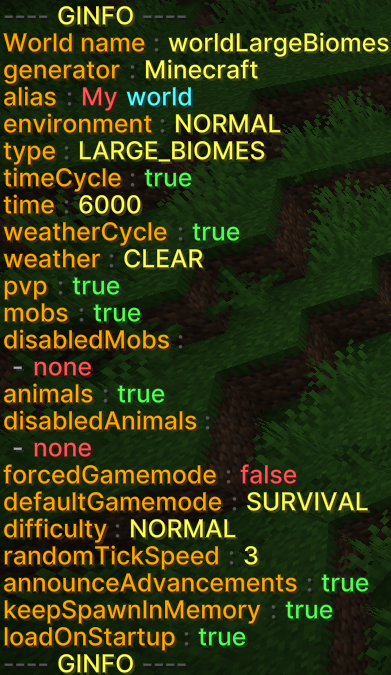
# /ginfo - Informationen about a world

Sometimes it can be helpful to see all the information and settings for a world at a glance.  
<span style="white-space: pre-wrap;">The command </span>`<span class="editor-theme-code">/ginfo</span>`<span style="white-space: pre-wrap;"> is available for this purpose.</span>

## The command in detail

`<span class="editor-theme-code">/ginfo [name]</span>`

### Parameters explained

1. **Name (optional):** The name of the world
    - If the name is left blank, the user's current world will be selected.

---

## Screenshot from the game

[![GWorld-ginfo-en-v2.png](https://books.gilljan.de/uploads/images/gallery/2026-02/scaled-1680-/GgQxp1Del0p4lXVw-gworld-ginfo-en-v2.png)](https://books.gilljan.de/uploads/images/gallery/2026-02/scaled-1680-/PelxHlU4gQOOIAGn-ginfo-en.png)
---

## Examples

### 1. Information about the current world

Get information about the current world:

```bash
/ginfo
```

### <span style="white-space: pre-wrap;">2. Information about another world </span>

Get information about the world “MyWorld”:

```bash
/ginfo MyWorld
```

# /gtp - Teleport between worlds

Teleporting between worlds is also an important function.

The command may seem a little complicated due to the various permissions, but it is easier than you might think.

## The command in detail

`<span class="editor-theme-code">/gtp <name> [player name|@all]</span>`

### Parameters explained

1. **Name (required):** The name of the world to which the player should be teleported.
2. **Player name/@all (optional):**  
    
    1. **Player name:** The name of the player to be teleported.
    2. **@all:** Teleport all players except yourself to the desired world.

### Permissions

#### <span style="white-space: pre-wrap;">Basic permission: </span>`<span class="editor-theme-code">gworld.commands.tp</span>`

<span style="white-space: pre-wrap;">The basic permission is </span>**ALWAYS** required for the command to be used and automatically completed.

#### <span style="white-space: pre-wrap;">Teleport to all worlds: </span>`<span class="editor-theme-code">gworld.commands.tp.*</span>`

This permission is required if you want to be able to teleport to all worlds.

#### <span style="white-space: pre-wrap;">Teleport to specific worlds: </span>`<span class="editor-theme-code">gworld.commands.tp.< world-name></span>`

With this permission, a user may only teleport to the world specified within the permission.

#### <span style="white-space: pre-wrap;">Teleport other players: </span>`<span class="editor-theme-code">gworld.tp.other</span>`<span style="white-space: pre-wrap;"> </span>

<p class="callout warning">**Attention**: This permission differs from the others!</p>

With this permission, the user can teleport all players to other worlds by using the player name itself or @all.

---

## Examples

### 1. Teleport to a world

In this example, you want to teleport to the world “MyWorld”:

```bash
/gtp MyWorld
```

### 2. Teleport a player to a world

In this example, the user “MyUser” should be teleported to “MyWorld”:

```bash
/gtp MyWorld MyUser
```

### 3. Teleport all players to one world

In this example, all users are to be teleported to the world “MyWorld”:

```bash
/gtp MyWorld @all
```